Posts

Showing posts with the label trick

Simple trick to auto-complete URL's

Image
I learnt a simple trick a few days back which can save beginner users a lot of hassle and others a lot of typing. For Example, to open google on a web browser, we need to type http://www. in the beginning and .com at the end. Many times we get confused between forward slash and back-slash! The trick is simple : Type "google" in address bar Then, press "ctrl" + "Enter" keys together : It'll prefix http://www. and suffix .com to the word you've written. And guess what, this works on all browsers.
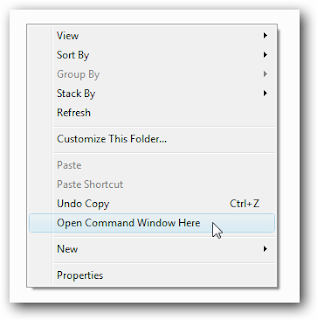
Open Command Prompt(cmd) directly from a folder

Image
Instead of opening command prompt and then moving into the required folder using "cd" command , you can use a simple trick available in Windows to do the same thing.  This requires no third-party software to be installed on your system. Steps: Move to the folder in which you want to use command prompt Hold "SHIFT" key and right-click in an empty area Select "Open command window here" This will open command prompt with path changed to your current directory rather than "C:\Users\Your User Name". Screen-shots : * you can also right-click on any folder icon in the system while holding down the shift key to do the same. Tested on :    Windows 7 Ultimate